
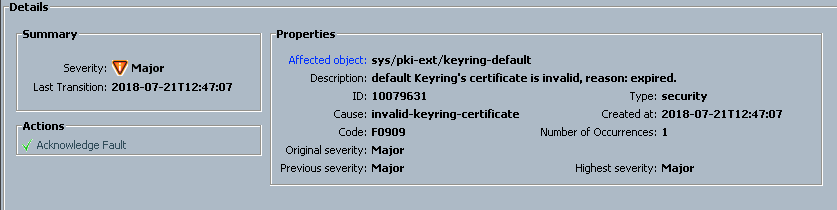
The default UCSM keyring certificate needs to be regenerated if cluster name changes or certificate expires( one year valid).
Below are the steps you need to perform in-order to regenerate the certificate.
- SSH to UCS manager cluster IP address as admin user and run below commands.
FI-A# scope security
FI-A /security # scope keyring default
FI-A /security/keyring # set regenerate yes
FI-A /security/keyring* # commit-buffer
FI-A /security/keyring #
2. When you say commit buffer all GUI connections will be disconnected.
3. After couple of minutes you can see error gets cleared from UCS.
Status before regeneration:
FI-A /security/keyring # show detail
Keyring default:
RSA key modulus: Mod1024
Trustpoint CA:
Cert Status: Expired
After Regeneration:
FI-A /security/keyring # show detail
Keyring default:
RSA key modulus: Mod1024
Trustpoint CA:
Cert Status: Self Signed Certificate
I went over this site and I think you have a lot of excellent info , saved to bookmarks (:.