
Today i was trying to upgrade our esxi 6.0 (running on DELL poweredge) to esxi 6.5. Upgrade did not start and throwing conflicts vib error.
Got below message post removal.
Message: The update completed successfully, but the system needs to be rebooted for the changes to be effective.
Reboot Required: true
VIBs Installed:
VIBs Removed: LSI_bootbank_scsi-mpt3sas_04.00.00.00.1vmw-1OEM.500.0.0.472560
VIBs Skipped:
rebooted the ESXi host and then tried to upgrade it. It completed successfully.
Below is the screenshot of error which i was receiving.
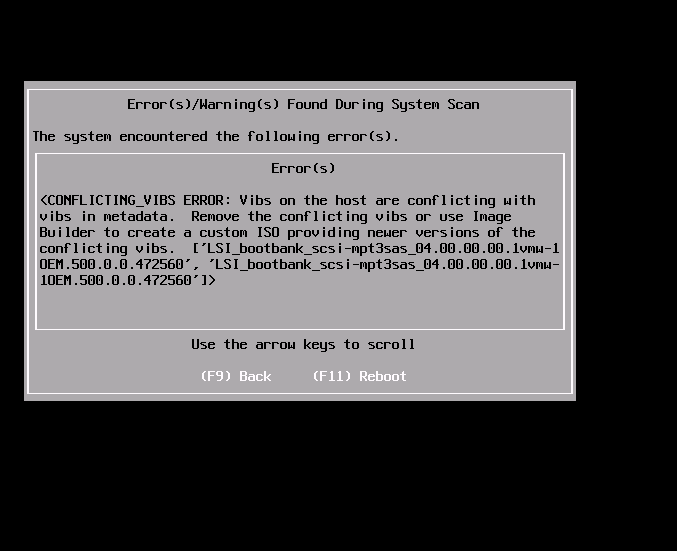
After checking VMWare documentation i found ‘mpt3sas’ driver which enables support for AVAGO MPT Fusion based SAS3 (SAS 12.0 Gb/s) Controller(s). Dell don’t support this device and hence this driver can be safely removed.
so i opened ssh session to esxi host and removed conflicting vib using below command.
esxcli software vib remove -n scsi-mpt3sas
Got below message post removal.
Message: The update completed successfully, but the system needs to be rebooted for the changes to be effective.
Reboot Required: true
VIBs Installed:
VIBs Removed: LSI_bootbank_scsi-mpt3sas_04.00.00.00.1vmw-1OEM.500.0.0.472560
VIBs Skipped:
rebooted the ESXi host and then tried to upgrade it. It completed successfully.