
Today When we were performing Pre-check for VCF 4.4 to 4.5 upgrade, one of the ESXi host was keep on failing at step ESXi Temporary Directory Exist.
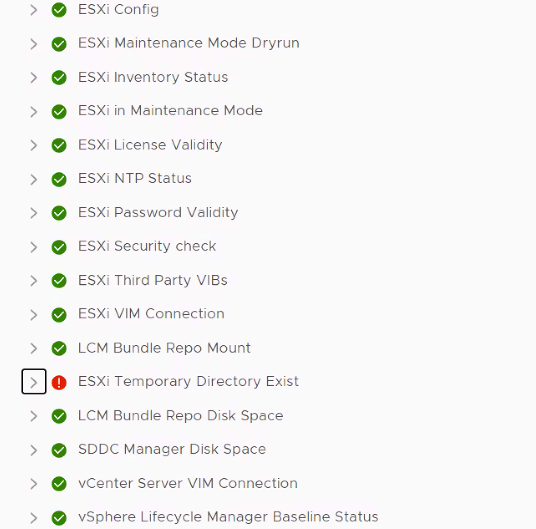
Below was the Remediation message for the error,
Please check 1) If directory /scratch/downloads exists on host. Note that the /scratch is the link to the configured scratch partition. Please refer to kb article: https://kb.vmware.com/s/article/1033696
2) If directory /locker on host has enough space needed during upgrade process and/or is not corrupted by a prior task, if vsan traces have consumed the /locker directory space. Please refer to kb article: https://kb.vmware.com/s/article/2030665
3) Check if directory /locker on host i.e., the SDDC VM NFS mount directory is reachable and if not restart NFS service on SDDC Manager VM if required using ‘systemctl restart nfs-server’.
4) Check if the symlink for /bootbank and /altbootbank are linked to correct folders and that the actual folders exist.
None of the Remediation was applicable in my case. After troubleshooting we figured out SDDC Manager was unable to SSH to particular ESXi host. ecdsa key of the host was missing from known hosts file. Below are the remediation steps.
- Known_hosts file is located in two different directories.
i) /home/vcf/.ssh/
ii)/etc/vmware/vcf/commonsvcs.
Known_hosts file contains keys for all VCF Components. Each ESXi host has rsa key and ecdsa key.
2. In My case, ecdsa key of failed ESXi was missing from both files.
3. Before making any changes, lets take a snapshot of SDDC Manager from vcenter.
4. Then backup both known_hosts file by running below commands.
cp -rf /home/vcf/.ssh/known_hosts /home/vcf/.ssh/known_hosts.bak
cp -rf /etc/vmware/vcf/commonsvcs/known_hosts /etc/vmware/vcf/commonsvcs/known_hosts.bak
5. To generate ecdsa key, take putty session to SDDC Manager and run below commands.
ssh-keyscan -4 -t ecdsa ESXi_FQDN >> /home/vcf/.ssh/known_hosts
ssh-keyscan -4 -t ecdsa ESXi_FQDN >> /etc/vmware/vcf/commonsvcs/known_hosts
6. Verify keys are available in Known hosts file.