Most VCF minor-version upgrades are a bill-of-materials refresh. You stage bundles, you work down the stack, components land on new builds, and the shape of your environment at the end looks like the shape at the start. The 9.0 to 9.1 transition is not that.
The difference is that 9.1 introduces a new layer — VCF Management Services — and folds capabilities that used to live in dedicated appliances into it. Broadcom’s own upgrade guidance describes existing appliances being automatically decommissioned during the transition, with their capabilities consolidated into a single-appliance architecture fronted by VCF Operations. That means the upgrade does two things at once: it moves versions, and it changes the topology of your management domain.
Which explains the tone of the release notes. Broadcom states plainly that upgrading to 9.1 requires a strict component upgrade sequence, and the release notes carry a dedicated section on what goes wrong when the order is violated. This piece walks the architecture first, because the sequence only makes sense once you understand what is being built.
01 — The shift From appliances to a runtime
In 9.0, fleet management and control-plane operations were spread across separate standalone virtual appliances. Each had its own lifecycle, its own credentials, its own upgrade bundle, its own IP address and DNS record. In 9.1 those functions are centralised into a single runtime layer.
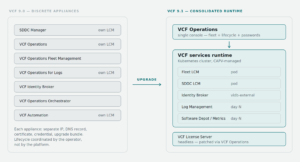
Two consequences fall out of this immediately, and both affect planning rather than execution.
First, you need new network resources before you start. The runtime is a cluster of node VMs, so it needs a pool of static IPs and matching forward and reverse DNS records, plus a record for the new headless VCF License Server. This is not something you can improvise mid-upgrade.
Second, the strictness of validation went up. Broadcom’s guidance calls out that all existing and new network assignments must use strictly lowercase forward and reverse DNS records, specifically to avoid switchover validation failures. Mixed-case DNS that worked fine in 9.0 becomes an upgrade blocker in 9.1.
02 — Architecture What VCF Management Services actually is
The layer Broadcom calls VCF management services — often shortened to VMSP in the field, and surfaced in the VCF Operations UI as VCF Services Runtime — is a Kubernetes cluster whose workloads are the management components themselves.
It has two node roles. Control plane nodes run the Kubernetes control plane: API server, etcd, scheduler. They manage the cluster and nothing else. Worker nodes run the actual service pods and host the virtual IPs the platform needs. The count of each depends on the sizing and redundancy model you choose.
The distribution of components across instances is the part worth internalising, because it determines blast radius. The services runtime in your first VCF Instance hosts the fleet-level components that perform global operations, plus the instance-level components for that instance. Every other VCF Instance gets a services runtime that hosts only instance-level components, running local tasks.
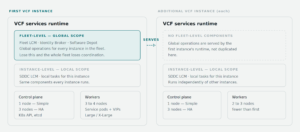
Figure 2. Fleet-level components exist once, in the first instance. Every instance carries its own instance-level set. Worker counts shown are the ranges across sizing models — see the table below for the exact figures.
Sizing, and what actually triggers a new worker
The node counts are fixed by the sizing model you pick at bring-up, and they differ depending on whether the runtime belongs to the first instance or a subsequent one.
| Model | First instance | Additional instance | Control plane availability |
|---|---|---|---|
| Simple | 1 CP + 3 × Large | 1 CP + 2 × Large | vSphere HA only |
| HA — Medium | 3 CP + 3 × X-Large | 3 CP + 2 × X-Large | Clustered control plane |
| HA — Large | 3 CP + 4 × X-Large | 3 CP + 3 × X-Large | Clustered control plane |
The Simple model relies on vSphere HA for availability. That is adequate for host failure, but losing the single control plane node means redeploying the cluster and restoring from backup — worth weighing before you choose it for anything you care about.
Worker scale-out is the detail most people get wrong, so to be precise: this is not Kubernetes autoscaling reacting to CPU pressure. Scale-out is driven by the declared resource footprint of components at install or resize time. Four things cause a new worker to appear:
- Bring-up — the count from the table above.
- Day-N component installation. Some components are not deployed at bring-up and adding them forces scale-out. In the first instance, log management and real-time metrics are day-N and require additional workers. In an additional instance, real-time metrics, identity broker, and software depot are day-N.
- Scaling an installed component. Log management is the main one — adding replicas or moving up a size profile pulls in more worker capacity, and it cannot be scaled back down afterwards.
- Manual runtime resize from Simple to Medium or Large, under Build → Lifecycle → VCF Management → VCF Services Runtime. Workers are replaced gradually rather than all at once.
03 — Starting position Which path you are actually on
Before the sequence, establish which flow applies. 9.1 deliberately widened the supported entry points, and the answer changes what you execute.
If you are on 9.0.x, you are on the in-place component upgrade path described below. If you are on 5.2.x, VCF 5.x more broadly, or a vSphere 8.x plus Aria Operations 8.x combination, there are separate documented flows — and the minimum supported vSphere baseline for those is 8.0 U2 or U3 depending on the flow. Nothing older is documented, because 6.x and 7.x are end of support.
One entitlement caveat worth flagging early, because it surprises people: in a vSphere Foundation deployment the SDDC and Fleet LCM services do get deployed as part of management services, but they exist to lifecycle the log management component — not to provide general fleet management, which is a VCF entitlement. VVF administrators continue to update vCenter through VAMI and ESX through vLCM, exactly as before. If you see vCenter and ESX missing from Build → Lifecycle in a VVF environment, that is expected behaviour rather than a broken upgrade.
There is also now a documented option to deploy vSphere Foundation 9.1 without VCF Management Services at all, for environments that do not need the layer and would rather not pay its resource cost. In that configuration the License Server is a no-op for operators — VCF Operations patches it automatically as part of the PAK.
04 — Execution The strict sequence
What follows groups Broadcom’s published component list into phases. The grouping is a reading aid; the authoritative ordering lives in the Upgrading to VMware Cloud Foundation 9.1 documentation, and incorrect sequencing is called out in the release notes as a known source of errors. Read the docs alongside this, not instead of it.
VCF Operations and Cloud Proxy
The console goes first. Everything downstream is orchestrated from here, so 9.1 Operations has to be in place before it can drive anything else. Cloud Proxy moves with it.
SDDC Manager
SDDC Manager reaches 9.1 next. It still holds inventory and credential state that the management services deployment reads from, so it has to be current before that deployment runs.
Deploy VCF Management Services and License Server
The architectural step. The Kubernetes runtime is bootstrapped, the fleet-level and instance-level components are placed onto it, and the headless License Server is deployed. This is where the appliance consolidation in Figure 1 actually happens, and where the IP pool and DNS work you did up front gets consumed.
Transfer licenses
Licensing moves to the new License Server model. Do not treat this as administrative cleanup you can defer — license assignment failures on 9.1 are a documented enough problem that Broadcom published a dedicated KB for them.
NSX — Global Manager, then Local Managers
In a federated environment, NSX Global Manager nodes upgrade before local NSX Managers. Managers only at this stage — Edges come later, deliberately.
vCenter
vCenter follows NSX Manager. The ordering matters because of compatibility between the NSX management plane and the vCenter it registers against during the transition window.
ESX, including vSAN witness hosts
The compute fabric. vSAN witness hosts are upgraded alongside ESX. This is the longest phase in wall-clock terms and the one that consumes maintenance windows.
NSX Edge cluster, then finalize NSX
Edges upgrade after the hosts, and the NSX upgrade is formally finalized. Until finalize completes, NSX is still in a transitional state regardless of what the component versions say.
The tail — after the sequence
Four items sit outside the strict ordering and are commonly deferred to later windows: VMware Tools to 13.1, virtual machine hardware compatibility, vSAN on-disk format versions, and vSAN File Service. None of them gate the platform reaching 9.1, but leaving on-disk format behind means leaving vSAN capabilities on the table.
Treat these as scheduled follow-up work with their own change records, not as leftovers.
05 — FrictionBehaviour changes that bite
These are drawn from the 9.1 product support notes. None of them will stop the upgrade, but each one has quietly broken something for someone.
FIPS is on, permanently
From 9.1, FIPS compliance is enabled by default and cannot be disabled. The concrete fallout: any existing Network Share plugin, its configuration, and its data are automatically removed during the upgrade, because the plugin depends on components that are not FIPS-compatible. If you deliver scheduled reports to a file share, that pipeline stops. The documented replacement is the Standard Email plugin with reports as attachments.
Log content packs are done
Starting with 9.1 you cannot use VCF Operations for Logs content packs in VCF Operations — general support has ended. If your log dashboards and alerts are built on content packs, that is remediation work to schedule, not a surprise to discover afterwards.
The logs agent needs system OpenSSL 3
The 9.1.0 logs agent no longer bundles an OpenSSL library and uses the host’s default instead. On hosts without OpenSSL 3 or higher the agent simply fails to function. Either bring those hosts up to date or stay on an older agent that still bundles the library — but know which you have chosen.
vCLS surface removed
vCLS was decoupled from DRS and HA in 9.0. In 9.1 all vCLS functionality is removed from both the SDDC Manager UI and the VCF Installer UI, and vCLS is slated for deprecation in a future release. Any runbook step that touches vCLS through those interfaces needs rewriting.
Configuration drift moved
VCF Operations Configuration Drifts has been absorbed into the new VCF Operations Fleet Configuration Management service. The capability survives; the location and likely the API surface do not.
Non-ASCII input is rejected
VCF 9.1 components do not accept non-ASCII input, even though the product itself ships in English, Japanese, Spanish and French. Object names, descriptions and tags carrying accented or multi-byte characters are worth auditing before the upgrade rather than during it.
06 — Afterwards What to verify, and what changed underneath you
Once the sequence completes and the runtime is up, a few operational habits need updating — because the management plane genuinely is a different thing now.
Password management moved. It now lives in VCF Operations under Fleet Management, and 9.1 adds password policies: length, complexity, expiration, lockout, change interval and history, created in VCF Operations and assigned to the whole fleet, to the management components, or to individual instances — with one active policy per fleet object. Worth configuring deliberately rather than inheriting defaults.
Some accounts sit outside that engine. Broadcom’s own guidance acknowledges that certain Fleet Management components fall outside automated rotation and need manual lifecycle management. The clearest example is the VCF Automation service account in vCenter and NSX, which is not rotated from VCF Operations at all — it is deleted and recreated through the Rotate service account action against a VCF Instance in the VCF Automation UI. Find that action before you need it in anger.
Check what the runtime actually deployed. Confirm worker node count against the sizing model you chose, confirm remaining free addresses in the IP pool, and confirm CAPV anti-affinity has spread nodes across hosts. Node anti-affinity is handled by Cluster API rather than DRS rules, so the absence of DRS rules is not a misconfiguration.
Re-baseline your backups. The topology changed, which means your backup coverage map is out of date. vCenter uses native file-based backup, SDDC Manager and NSX Manager use SFTP targets, and VCF Operations uses image-based backup. Confirm all three, and confirm restore — not just that jobs complete.
07 — Closing Plan it as a migration
The temptation with a x.1 release is to schedule it like a patch. The material difference here is that 9.1 rebuilds your management plane on a Kubernetes substrate, decommissions appliances while doing it, and consumes network resources that must exist beforehand. Those are migration characteristics, not patch characteristics.
Which means the work that determines whether this goes well happens before any bundle is staged: audit DNS for case, size and reserve the IP pool with scale-out headroom, choose the sizing model with the control-plane failure mode in mind, verify restores rather than backups, and inventory the deprecations against what you actually use. The eight-phase sequence itself is well documented and largely orchestrated. The preparation is where the discretion lives — and where the failures come from.
Sources Reference material
- VMware Cloud Foundation 9.1 Release NotesBroadcom TechDocs
- Upgrade Sequence to 9.1Broadcom TechDocs
- What’s New in VCF 9.1Broadcom TechDocs
- Product Support Notes — VCF 9.1Broadcom TechDocs — deprecations and behaviour changes
- Upgrading to VMware Cloud Foundation 9.1Broadcom TechDocs — authoritative sequence
- Deploy VCF Management Services and License ServerBroadcom TechDocs
- VCF Management Services ModelsBroadcom TechDocs — component and deployment models
- VCF Fleet Sizing ModelsBroadcom TechDocs — node count table
- VCF Management Services Detailed DesignBroadcom TechDocs
- Components in VCF and vSphere FoundationBroadcom TechDocs
- Managing Passwords for VCF ComponentsBroadcom TechDocs — 9.1 password policies
- Planning and PreparationBroadcom TechDocs — download the workbook
- Modernizing Infrastructure: VCF 9.0.x to 9.1 Upgrade GuideShubham Pareek and Vijay Kondeti, VCF Blog — includes two-part video walkthrough
- Demystifying Supported Upgrade Paths to 9.1William Lam — path selection and VVF entitlement caveats
- VCF Upgrade Planner ToolWilliam Lam
- KB 440630 — Flexible VCF 9.1 upgrade pathsBroadcom Knowledge Base
- KB 424533 — License assignment failure on VCF 9.1Broadcom Knowledge Base
- KB 435599 — Password expiration and rotation in VCF 9.xBroadcom Knowledge Base
- VCF 9.1 Feature Comparison and Upgrade PathsVMware — VVF versus VCF entitlement matrix