VCF 9.1 introduces VCF management services to provide a unified architecture for centralized lifecycle and operational functionalities. The VCF services runtime instance of the first VCF Instance hosts the fleet-level VCF management services components that perform global operations plus the instance-level components for that VCF Instance. Every VCF Instance has a VCF services runtime instance that hosts the instance-level VCF management services that run local tasks.
Under the hood it’s a Kubernetes cluster — often called VMSP (VCF Management Services Platform) in the field, and surfaced in the UI as VCF Services Runtime. Logging into one of the VMSP cluster VMs lets you interact with the Kubernetes cluster directly; three of the VMs run the control plane components that manage the K8s cluster itself, and the remaining nodes run the pods for the various VCF Management/Fleet/LCM components. Namespaces include vidb-external (Identity Broker), vmsp-platform (the core runtime components), and vmsp-policies.
This is a real architectural shift: components that used to be standalone appliances (Fleet LCM, SDDC LCM, Identity Broker, Salt, depot, log management) are now pods on a shared K8s substrate.
Node roles
The VCF Management Service is composed of two node types. Control nodes manage and maintain the infrastructure — they form the control plane of the service, and in a high-availability deployment there are typically three. Worker nodes run the actual services and host the virtual IPs (VIPs) required by the platform; the number of worker nodes depends on the sizing and redundancy options selected during deployment.
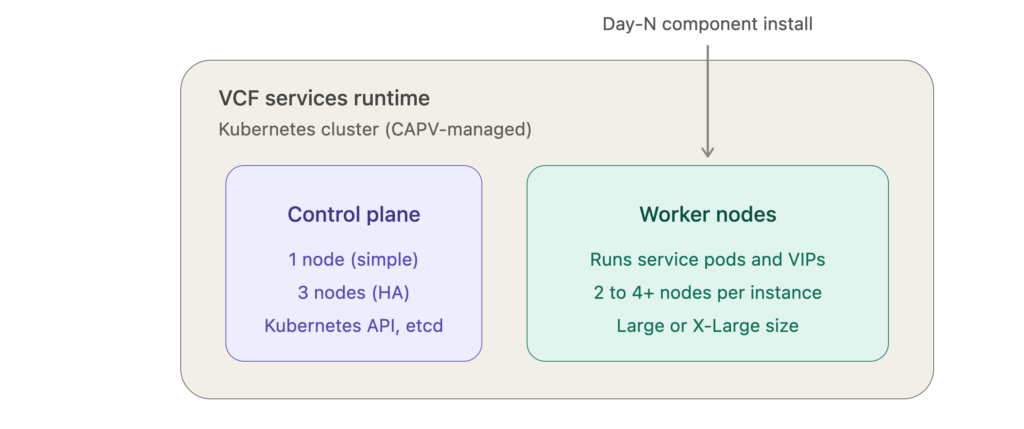
Sizing — the official numbers
From the VCF Fleet Sizing Models page (this is the authoritative table for what VCF Installer deploys):
First VCF Instance
| Model | Control plane | Workers |
|---|---|---|
| Simple | 1 node | 3× Large |
| HA – Medium | 3 nodes | 3× X-Large |
| HA – Large | 3 nodes | 4× X-Large |
Additional VCF Instance
| Model | Control plane | Workers |
|---|---|---|
| Simple | 1 node | 2× Large |
| HA – Medium | 3 nodes | 2× X-Large |
| HA – Large | 3 nodes | 3× X-Large |
Two things worth noting from the model definitions themselves: the Simple model deploys a single control plane node and multiple worker nodes and relies on vSphere HA as its availability mechanism, while the HA model deploys three control plane nodes with worker node specification and count depending on the chosen deployment size, giving high availability for both the control plane and the workers. The tradeoff on Simple is blunt — loss of the single control plane node would require redeploying the cluster and restoring from backup.
On actual VM specs, Broadcom publishes these through the Planning and Preparation Workbook rather than the design pages. Community-observed figures on 9.1 are a 4 vCPU / 10 GB control plane node and 12 vCPU / 24 GB worker nodes. I’d treat the X-Large worker figure as unconfirmed — populate the workbook’s Management Domain Sizing tab for your design rather than trusting a blog number.
When exactly a new worker node gets deployed
This is the part that surprises people, so let me be precise: it is not Kubernetes autoscaling reacting to live CPU pressure. Worker scale-out is driven by the declared resource footprint of components at install or resize time. There are four distinct triggers:
1. Initial bring-up. Count comes straight from the table above — determined by your chosen deployment model, size, and whether this is the first or an additional VCF Instance.
2. Day-N component installation (the automatic one). Some components are not deployed at bring-up and adding them forces scale-out. For the first VCF Instance, deploying the log management and real-time metrics components is a day-N operation and requires adding more worker nodes. For an additional VCF Instance, deploying real-time metrics, identity broker, and software depot are day-N operations that require adding more worker nodes.
Field observations match this precisely: adding Real-Time Metrics results in another worker being deployed into the services runtime at 12 vCPU and 24 GB, and adding Log Management causes the management services K8s cluster to be automatically resized as capacity is needed — again an extra worker at 12 vCPU / 24 GB. The design requirement is explicit that adding additional components may require auto-scale out of the VCF management services.
3. Scaling a component that’s already installed. Log management is the big one. Each management services node consumes 12 vCPU / 24 GB for the small size profile and 24 vCPU / 48 GB for the medium and large profiles, and the IP guidance is roughly 6 IPs for an initial log management installation plus 1 IP per small or medium replica and 2 IPs per large replica. Adding replicas or bumping the size profile therefore pulls in more worker capacity.
4. Manual runtime resize. In VCF Operations under Build → Lifecycle → VCF Management → VCF Services Runtime you can scale the runtime from Simple to Medium or Large. This changes worker specification, and after scaling to medium the worker nodes are replaced gradually rather than all at once — a rolling replacement.
Mechanically, because this is a CAPV-managed cluster, scale-out is a machine-deployment replica increase: Fleet LCM computes whether the new component’s pod resource requests fit the existing allocatable capacity, and if not, clones a new node VM which joins the cluster and gets scheduled onto.
Design constraints and gotchas
- IP pool sizing is a hard dependency. You must allocate a sufficient IP range for the required number of control plane and worker nodes for your chosen deployment type, precisely because adding components may auto-scale the cluster out. Under-size the pool and a day-N component install fails. Provisioning ~30 IPs is a reasonable production starting point.
- Anti-affinity is handled by CAPV, not DRS. The design uses Kubernetes Cluster API Provider vSphere node anti-affinity to keep nodes on different ESX hosts, which means DRS anti-affinity rules are not required. Nodes are also protected by vSphere HA so an ESX host failure needs no manual intervention.
- Placement is a single vSphere cluster — the default management domain cluster.
- Scaling is largely one-way. Log management in particular cannot be scaled back down to fewer replicas once scaled up, and the size profile can’t be reduced either — hence the recommendation to move to medium once you exceed 5–6 small replicas.
- Simple can’t get an HA control plane through the UI. The Fleet LCM UI only supports scaling up, so the only supported UI path to HA is moving to Medium or Large, which brings additional workers and resource consumption. William Lam demonstrated that the VCFMS API can enable HA on an existing Small deployment by adding two more control plane nodes without increasing worker count — useful to know, but it’s outside what the UI supports.
Reference documents
Official Broadcom TechDocs (VCF 9.1):
- VCF Management Services Models — component models and deployment models, with the fleet vs. instance component matrix
- VCF Fleet Sizing Models — the node count table above
- VCF Management Services Component Detailed Design — including the first instance and additional instance models with FQDN mappings
- VCF Management Services Detailed Design (availability) — Simple model and HA model with the VCF-MS-REQD design requirement IDs
- VCF Management Network Detailed Design — shared vs. dedicated VLAN models for the nodes
- Log Management Detailed Design — the per-node CPU/memory/IP consumption figures
- Planning and Preparation — download the workbook here for exact resource requirements
Community deep-dives:
- How to Debug the VCF Management Service (VCF 9.1) — node roles, CIDR, and log inspection
- High level overview of VCF Management services in VCF 9.1 — namespace and pod layout
- VCF 9.1.x Ultimate Deployment Guide — observed worker additions per component
- Enabling HA for a Small VCFMS Deployment — the VCFMS API approach