If you run VMware Cloud Foundation (VCF) 5.2 with the full Aria Suite on Application Virtual Networks (AVN), you can upgrade straight to VCF 9.1. You don’t need to stop at 9.0 first. Broadcom documents this as a supported sequential or skip-level upgrade from 5.2.x (TechDocs).
This guide is written for two audiences. Decision-makers get a clear picture of what changes and why it is worth it. Engineers get every prerequisite in one place, taken from Broadcom TechDocs and the official VCF Upgrade Planner.
Why upgrade? VCF 9.1 brings management under one roof. The separate Aria Suite products become VCF Operations, VCF Automation and new VCF management services, all run from one console. Lifecycle tasks such as upgrades, certificates and passwords move from several tools into VCF Operations. And the platform stays on a supported, forward-looking release line.
Where you are, and where you’re going
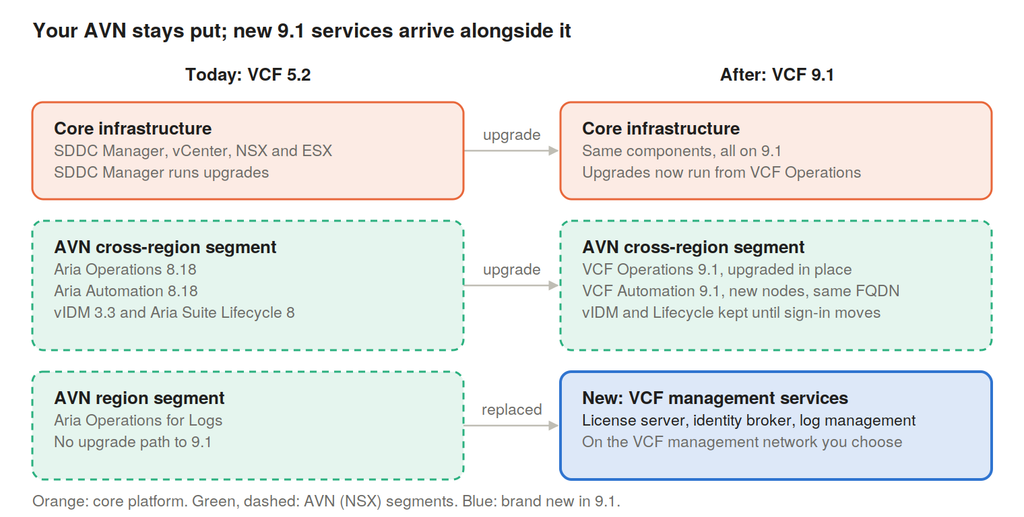
The core platform stays the same shape: the same servers, vCenter and NSX, just on newer versions. The upgraded Aria tools keep living on your AVN segments. What’s new is a set of VCF management services that take over upgrade, licensing and sign-in duties, plus a new log management service.
Jargon buster: the terms in plain English
You don’t need to be an engineer to follow this guide. Here is what the main terms mean.
| Term | In plain English |
|---|---|
| VMware Cloud Foundation (VCF) | The full private cloud platform: servers (ESX), their manager (vCenter), storage (vSAN), networking (NSX) and the tools that run them |
| Management domain | The small group of servers that runs the tools that manage everything else. It is always upgraded first |
| Workload domain | The servers that run your business applications. Upgrading them can wait until after the management domain |
| SDDC Manager | The VCF 5.2 “control tower” for upgrades. In 9.1 its job moves into VCF Operations |
| Aria Suite | The VCF 5.2 family of management add-ons: Aria Operations (monitoring), Aria Automation (self-service), Aria Operations for Logs, Aria Operations for Networks and Aria Suite Lifecycle (which upgrades the others) |
| VMware Identity Manager (vIDM) | The single sign-on service that Aria products log in through in 5.2 |
| Application Virtual Networks (AVN) | Private software-defined networks (NSX segments) that VCF 5.2 created to host the Aria Suite. Think of them as a dedicated, portable “room” for the management tools |
| VCF Operations | The 9.x successor to Aria Operations, and now the single console for monitoring and lifecycle |
| VCF Automation | The 9.x successor to Aria Automation, for self-service provisioning |
| VCF management services | A new set of 9.1 services running on a shared runtime. They take over the jobs of Aria Suite Lifecycle, and include fleet lifecycle, SDDC lifecycle, the software depot, identity broker and more |
| License server | A new, mandatory 9.1 appliance that holds your licences |
| Identity broker | The 9.1 successor to vIDM for single sign-on |
Prerequisites: everything to have ready before day one
Most of the work in this upgrade is preparation. Tick off every item below before you book the change window. Each one comes from Broadcom TechDocs or the VCF Upgrade Planner (links in Sources).
1. Versions and upgrade path
- Verify your supported upgrade path. Check your exact 5.2 build against the 9.1 upgrade guide in Broadcom TechDocs and the VCF Upgrade Planner, and confirm it has a supported route to your target 9.1 release.
- Respect the forward-only rule. You can only upgrade to a 9.1 release that came out after your current release. For example, VCF 5.2.4 (May 2026) can go to 9.1.1 but not to 9.1.0.
- Check component versions. Aria Operations and Aria Automation should be on 8.18.x. Aria Operations for Networks must be 6.14.0 Patch 6, 6.14.1 or later to be imported and upgraded.
- Check the Interoperability Matrix for every component, including add-ons such as HCX, Site Recovery or Avi.
- Download binaries in advance. If SDDC Manager has no internet access, use the VCF Download Tool to fill an offline depot.
2. Hardware and vSphere
- Check the hardware compatibility list for ESX 9.1. Intel Skylake-SP CPUs are supported in deprecated mode only in 9.1.x.
- Check each host’s boot bank is at least 1 GB (
df -h /bootbankon the host). - Move clusters from vLCM baselines to vLCM images. Baseline-based lifecycle is no longer supported, so this transition is part of the upgrade.
- Replace Integrated Windows Authentication on vCenter with another identity provider configuration.
- Plan for Enhanced Linked Mode (ELM). If vCenters are linked, all vCenters in the ELM ring must reach 9.1, and ELM is broken as part of the identity broker transition.
3. Network, IP addresses and DNS
This is where most upgrades get stuck. New 9.1 components need fresh IP addresses and DNS records, created before you start.
| What | Addresses | DNS records | Where it lives |
|---|---|---|---|
| VCF services runtime IP pool (management services) | 12 minimum (/28); Broadcom recommends 30 (/27) | None | VCF management network, or a dedicated network (see the AVN section) |
| VCF services runtime | 1, outside the pool | 1 | Same network as the pool |
| Fleet component (fleet lifecycle, Salt RaaS, software depot) | 1, outside the pool | 1 | Same network as the pool |
| Instance component (SDDC lifecycle, Salt master, telemetry) | 1, outside the pool | 1 | Same network as the pool |
| Identity broker | 1, outside the pool | 1 | Same network as the pool |
| License server | 1, outside the pool | 1 | Same network as the pool |
| VCF Automation 9.1 nodes | 5 (target 9.1.0.400 and later) or a /29 block of 8 (9.1.0.0 to 9.1.0.300) | None | Same network as today’s Aria Automation nodes |
| VCF Automation services runtime | 1, outside the node block | 1 | Same network as the Automation nodes |
| VCF Automation user-facing FQDN | Reused automatically | Reused | Unchanged |
| Cloud proxy (only if you don’t have one in the first VCF instance) | 1 | 1 | Management network |
Also check:
- No
.localdomains for the new FQDNs, and no capital letters in them. - No overlap with 198.18.0.0/15. The services runtime uses this range internally. If you use it anywhere, plan to switch to 240.0.0.0/15 or 250.0.0.0/15 (selectable in the UI from 9.1.1, or through the API).
- All required ports are open, per VMware Ports and Protocols.
4. Capacity
- Size the management domain for new appliances. The VCF services runtime size you choose sets the size of every management service. Use the VCF Fleet Sizing Models and the Management Domain Sizing tab of the Planning and Preparation Workbook.
- Plan capacity for a blue-green Automation upgrade. New 9.1 Automation nodes run alongside the old ones until cutover, so you need room for both for a while.
- Plan the Log Management deployment. Aria Operations for Logs has no upgrade path, so its replacement is a new deployment.
5. Certificates, identity and licensing
- Check certificate Subject Alternative Names (SANs) on Aria Operations, Aria Automation and Aria Operations for Networks. Certificates with incomplete SANs are no longer supported.
- Keep vIDM and Aria Suite Lifecycle 8.x. vIDM has no upgrade path and still provides sign-in for VCF Automation until you migrate it to identity broker. Don’t delete either.
- Remove any VCF Operations proxy with SSL termination before deploying management services.
- Have licence access ready. VCF Operations must be licensed within 90 days of the upgrade, through the new license server and the VCF Business Services console.
6. Safety net
- Back up SDDC Manager, vCenter, NSX Manager and every Aria appliance, and test a restore.
- Snapshot the VCF Operations nodes right before its upgrade, and delete the snapshots afterwards.
- Export customised dashboards, alerts and reports. The upgrade resets out-of-the-box content to new defaults, so direct edits to it are lost.
- Check the cloud proxy log-forwarding edge case. An Aria Operations Cloud Proxy 8.18.x outside the first VCF instance, with an active Logs integration set up with a one-time key, is not supported after the upgrade and needs replacing.
What happens to each Aria component, and to AVN
Not every Aria product upgrades the same way. Some are upgraded in place, some are replaced by something new, and two are kept for a while. Knowing which is which tells you where to put IP addresses and what to switch off at the end.
| Today in VCF 5.2 | Becomes in VCF 9.1 | How | What it means for AVN |
|---|---|---|---|
| Aria Operations 8.18.x and cloud proxy | VCF Operations 9.1 and cloud proxy | In-place upgrade with a PAK file, done first | Stays where it is on its AVN segment |
| Aria Suite Lifecycle 8.x | Replaced by fleet lifecycle and SDDC lifecycle (VCF management services) | No upgrade. Keep it running to manage vIDM | Stays on AVN until vIDM is retired |
| (new) | VCF management services, license server, identity broker | New deployment after SDDC Manager is upgraded | New IPs and DNS records on the VCF management network, or a dedicated network you choose |
| VMware Identity Manager 3.3.x | Identity broker 9.1 | No upgrade. Sign-in for VCF Automation is migrated to identity broker after the upgrade | Stays on AVN until the migration is done; don’t delete it early |
| Aria Automation 8.18.x | VCF Automation 9.1 | Imported into VCF Operations, then a blue-green upgrade: new nodes are built next to the old ones, data is migrated, traffic switches, old nodes shut down | New nodes land on the same AVN segment as today, so you need 5 to 8 spare IPs plus 1 runtime IP and FQDN there. The user-facing FQDN is reused |
| Aria Automation Orchestrator (standalone) | VCF Operations orchestrator 9.1 | Upgraded with an ISO image | Stays on its current network |
| Aria Operations for Networks 6.14.x | VCF Operations for networks 9.1 | Imported into VCF Operations, then upgraded | Stays on its current network |
| Aria Operations for Logs | Log management 9.1 | No upgrade. Deploy log management new, as a Day-N task | The new service lands with VCF management services. Retire the old appliances on AVN after cutover |
AVN in plain words
In VCF 5.2, AVN gave the Aria Suite its own private, software-defined networks inside NSX. Typically there is a “cross-region” segment for Aria Operations, Aria Automation, vIDM and Aria Suite Lifecycle, and a “region” segment for Aria Operations for Logs.
The good news: you don’t have to rebuild or move your AVN to upgrade. VCF 9.1 explicitly supports placing VCF Operations and VCF Automation on a dedicated segment or custom NSX network. Your upgraded components can stay where they are.
Three design decisions do need making up front:
- Where the new management services go. With a 9.1.0.x target, the UI places management services, license server and identity broker on the VCF management network (by default the VM management network). From 9.1.1, the UI lets you pick the network, including an NSX segment. The API can also target a custom VLAN-backed network. Whatever you pick, management services and identity broker must share one network.
- IP space on the AVN cross-region segment. VCF Automation’s blue-green upgrade needs spare addresses on that segment. Check the segment’s free addresses now.
- The NSX Edge upgrade window. AVN traffic reaches the outside world through the management NSX Edge cluster. Edges are upgraded near the end of the sequence, so plan a short window when access to the management tools may be briefly affected.
The upgrade, step by step
The order matters, and Broadcom is strict about it. The rule of thumb: upgrade the management tools first, then the platform underneath them.
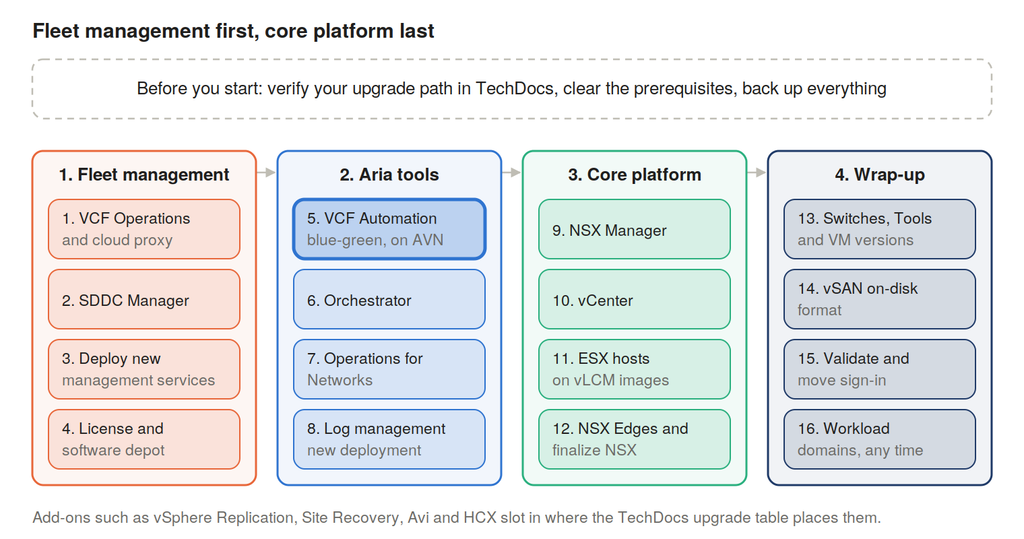
Phase 1: fleet management. Aria Operations is upgraded in place to VCF Operations 9.1, and its cloud proxies follow automatically. SDDC Manager is upgraded next. Then the new VCF management services, license server and identity broker are deployed, the environment is licensed, and the software depot is set up. From here on, VCF Operations is your control tower.
Phase 2: the Aria tools. Aria Automation is imported into VCF Operations and upgraded side by side, so users keep working until the switchover. This is the step that uses the spare IP addresses on your AVN segment. Orchestrator and Operations for Networks follow, and log management is deployed new.
Phase 3: the core platform. NSX Managers and vCenter go to 9.1, then the ESX hosts, cluster by cluster, using vLCM images. Workloads move off each host before it is upgraded. The NSX Edges come last, and they carry your AVN traffic, so plan this window carefully.
Phase 4: wrap-up. Distributed switches, VMware Tools, VM hardware versions and the vSAN disk format are brought up to date. You then validate the platform and move sign-in from vIDM to identity broker. Workload domains can follow whenever suits the business.
If a cloud proxy outside the first VCF instance forwards logs to Aria Operations for Logs, read the cloud proxy edge case in the prerequisites before phase 1.
After the upgrade: prove it, then tidy up
The upgrade is finished when the people who use the platform say it works, not when the last progress bar completes. Work through this list.
Prove it works
- Every management component shows 9.1 in VCF Operations, and there are no new critical alerts.
- VCF Operations is collecting data again through its cloud proxies.
- VCF Automation answers on its usual address, and a test request (deploy a small VM) succeeds.
- Logs are arriving in the new log management service.
- Application owners confirm their services are healthy.
Finish the job
- License the environment through the license server and the VCF Business Services console, well inside the 90-day window.
- Configure the fleet-level software depot so future updates can flow.
- Remove VCF Operations from Aria Suite Lifecycle’s inventory, without deleting the VM from vCenter.
- Migrate VCF Automation sign-in from vIDM to identity broker. Only then retire vIDM and Aria Suite Lifecycle.
- Retire the old Aria Operations for Logs appliances once log management is in service.
- Delete pre-upgrade snapshots, take fresh backups and update runbooks.
- From now on, run lifecycle tasks from VCF Operations. The SDDC Manager UI is being deprecated.
Workload domains can wait. Only the management domain and fleet-level components must reach 9.1. You can upgrade each workload domain later, at a pace that suits the business.
Sources
- VCF Upgrade Planner, scenario “VCF 5.2 to VCF 9.1, VCF Automation included” (planner data on GitHub)
- Upgrading to VMware Cloud Foundation 9.1.x
- Upgrading to VCF Operations 9.1
- Deploy VCF Management Services and License Server as Part of VCF Upgrade to 9.1
- Upgrading to VCF Automation 9.1
- Network Deployment Options for VCF Components
- VMware Interoperability Matrix
- VMware Ports and Protocols