
If you run vSphere or VCF on 8.x or 9.0.x today, you already have a supported route to VCF 9.1. You do not need a greenfield rebuild, a forklift migration or a single big-bang weekend.
The upgrade is designed as a set of levels. You choose how far to go now, land there safely, and move up later when your team and your business are ready. Each level is a real, supported end state, not a halfway house.
This is Part 1 of a two-part series. Here we cover where you can start, the three levels you can land on, and how to choose. Part 2 walks through how to plan and run the upgrade itself.
Where you start: 8.x and 9.0.x are both in scope
Every path to 9.1 begins from the same, broad starting point. If your core components sit on either the 8.x or the 9.0.x line, you qualify.
| Component | Supported starting versions |
|---|---|
| VCF Operations | 8.x or 9.0.x |
| vCenter | 8.x or 9.0.x |
| ESX | 8.x or 9.0.x |
That matters for adoption. Most estates are on 8.x, and many 9.0 early adopters want the 9.1 improvements. Neither group has to take an intermediate hop through 9.0 before they can plan for 9.1.
Before you commit, confirm exact build numbers against the Broadcom product interoperability matrix and the 9.1 release notes. “8.x” on a slide is a family, and a few specific builds may need a patch first.
The three levels at a glance
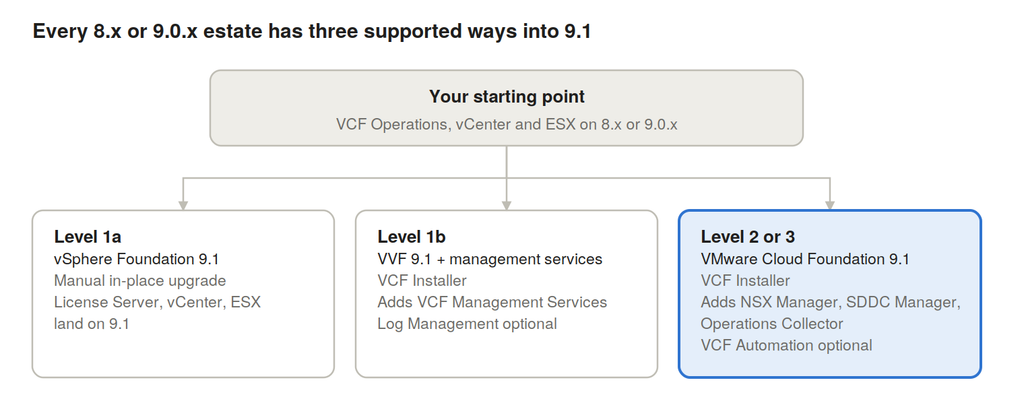
One starting point, three landing levels. Each level is a supported end state, and the further right you go, the more of the private cloud stack you take on.
Level 1a: vSphere Foundation 9.1, upgraded in place
Level 1a is the lowest-friction way onto the 9.1 platform. You upgrade your existing components in place, manually, and they land on 9.1: the License Server, vCenter and ESX.
Nothing about your topology changes. No new management stack is introduced, and your existing operational runbooks stay valid. If your team already patches vCenter and ESX on a regular cycle, this will feel familiar.
Level 1a is the right first move when:
- You want the 9.1 core platform now, with the smallest possible change window
- Your organisation is cautious about introducing new management components
- You want a stable 9.1 foundation in place before you decide how far to go next
The key point for adoption: Level 1a is not a dead end. Because you are now on 9.1, moving to Level 1b or to full VCF later is a step forward, not a re-platform.
Level 1b: vSphere Foundation 9.1 with management services
Level 1b gives you the same vSphere Foundation 9.1 platform, plus VCF Management Services. Instead of upgrading component by component, you use the VCF Installer, which deploys VCF Management Services alongside the License Server.
This is where 9.1 starts to feel like a managed platform rather than a set of products. The installer does the orchestration, so there are fewer manual steps and fewer chances for version drift between components.
Level 1b also unlocks Log Management. It is optional at this level, but it depends on VCF Management Services, so Level 1b is the minimum landing point if centralised logging is on your roadmap.
Choose Level 1b when:
- You are standardising on vSphere Foundation but want an installer-driven, repeatable lifecycle
- Centralised log management is a requirement, now or soon
- You want management services in place so the step to full VCF later is smaller
Level 2 or 3: full VMware Cloud Foundation 9.1
Level 2 or 3 takes you all the way to VCF 9.1. The VCF Installer drives it, and it adds three components to your estate: NSX Manager, SDDC Manager and an Operations Collector.
That combination is what turns a virtualised estate into a private cloud. NSX Manager brings software-defined networking and security. SDDC Manager brings full-stack lifecycle management. The Operations Collector feeds VCF Operations with the data it needs for monitoring and capacity.
You also keep flexibility on how much cloud you consume:
- VM Apps and All Apps consumption models are both supported: a VM-centric model, or VMs and Kubernetes workloads side by side
- VCF Automation is optional, so self-service and automation can come in when you are ready, not as a precondition
Choose Level 2 or 3 when:
- You want one lifecycle for compute, storage, network and management
- Network virtualisation and security are part of your strategy
- You are building towards a private cloud with self-service consumption
How to choose your level
Start from the outcome you need in the next 12 months, not the biggest feature list. Three questions usually settle it:
- Do you need network virtualisation or a private cloud model? If yes, go to Level 2 or 3.
- Do you need centralised log management or an installer-driven lifecycle? If yes, go to Level 1b.
- Do you mainly need the 9.1 platform with minimal change? Then Level 1a is your fastest win.
| Level 1a | Level 1b | Level 2 or 3 | |
|---|---|---|---|
| Lands on | vSphere Foundation 9.1 | vSphere Foundation 9.1 | VCF 9.1 |
| Method | Manual, in-place component upgrade | VCF Installer | VCF Installer |
| Components added | None (License Server, vCenter, ESX upgraded) | VCF Management Services | NSX Manager, SDDC Manager, Operations Collector |
| Log Management | Not available | Optional | Per your design |
| Best for | Fast, low-risk move to 9.1 | Managed vSphere estate | Full private cloud |
Whichever level you pick, the message is the same: 9.1 meets you where you are. In Part 2, we turn the choice into a plan, covering prerequisites, sequencing, validation and the pitfalls worth avoiding.














One thought on “Your Road to VCF 9.1, Part 1: Pick the Upgrade Path That Fits”